



Python Email Reply Agent – AI Auto Responder
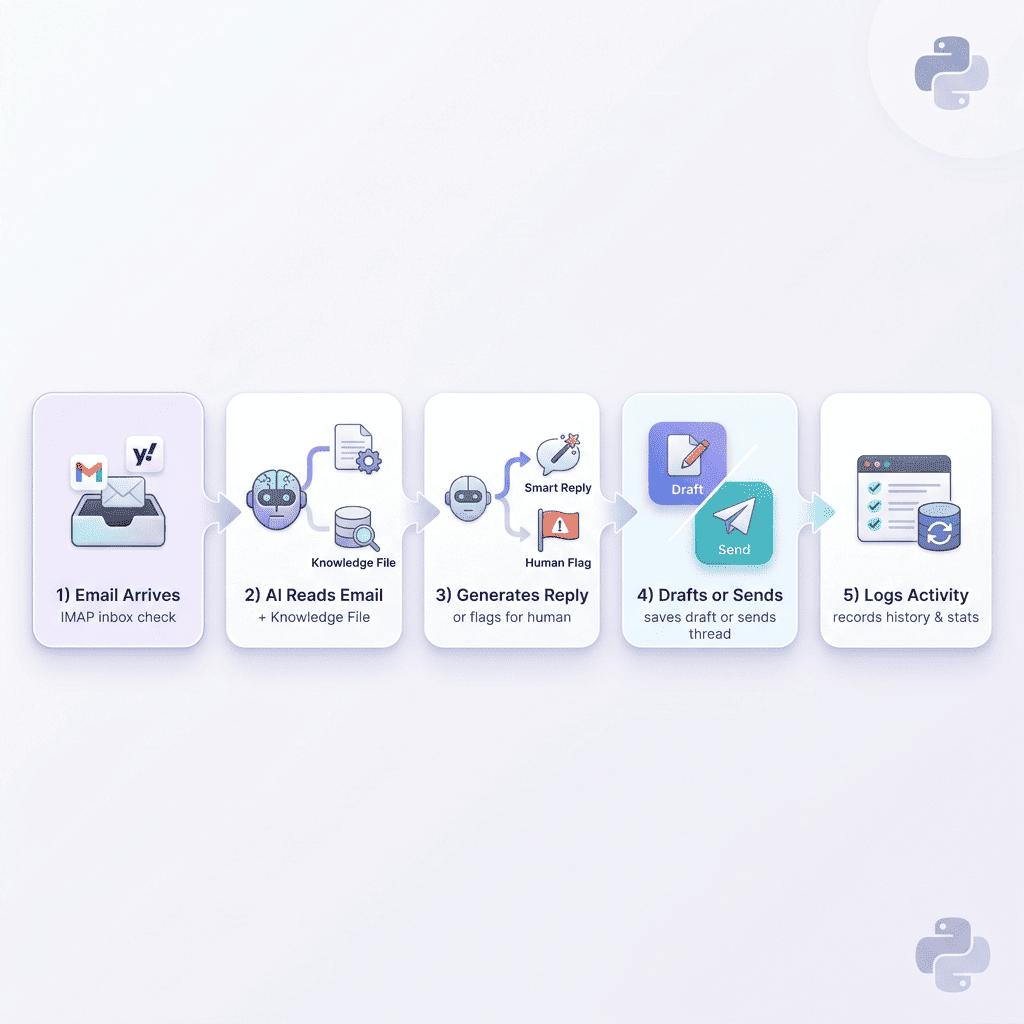
A Python agent that reads your inbox, writes replies from your own business info, and saves them as drafts or sends them automatically. Works with Gmail, Yahoo, Zoho, iCloud and any IMAP mailbox.
What it does
This is a complete Python project that answers customer emails for you. It reads new emails, writes a reply using your own business information, and either saves the reply as a draft for you to approve or sends it automatically.
How it works
- Detects new unread emails in Gmail, Yahoo, Zoho, iCloud or any IMAP mailbox
- Skips newsletters, no-reply senders and automated mail
- The AI reads the email and your knowledge file
- It writes a reply, or flags the email for a human
- The reply is saved as a draft or sent in the same email thread
Built to be safe
- Draft mode (default): review every reply before it goes out. Switch to auto-send when you trust the results.
- Skip rules: no replies to newsletters, no-reply addresses, bounces or senders you block. You can add your own rules.
- Knowledge file: the AI answers from your FAQ, prices and policies instead of guessing.
- Escalation: angry, legal, refund or unclear emails are flagged for you and left unread. You can get an alert email.
- Loop protection: ignores auto-replies, marks its own replies as automatic, and limits replies per sender per day.
Also included
- Choose Gemini, OpenAI or Anthropic with one setting
- Threaded replies with the correct "Re:" subject and the original message quoted
- Activity log in CSV, with optional Google Sheets logging
- A
--checkcommand that tests your mailbox, Drafts folder and AI key - A
--dry-runmode that shows what would happen and changes nothing - Run it on your computer, with cron, with Docker, on GitHub Actions, or on a Linux server
- An automated test suite
What you need
- Python 3.10 or newer
- An email account with IMAP enabled (Gmail, Yahoo and iCloud need an app password)
- An API key from Gemini, OpenAI or Anthropic (Gemini has a free tier)
Outlook, Hotmail and Microsoft 365 mailboxes are not supported in this version, because Microsoft requires its own sign-in instead of a password.
You Might Also Like

Bluesky AI Automation Bot
An automated Bluesky bot that creates and publishes AI-generated content using Gemini. Choose your topics, set a posting schedule, and optionally add AI-generated images. It can also like, repost, reply, and follow based on keywords you choose. The bot can reply to comments on its own posts too, with built-in limits and delays to control how often it interacts. It runs for free with GitHub Actions, so you don't need to rent or manage a server.

Bluesky Automatic Posting Bot
A ready-to-use Bluesky automation bot that uses Gemini AI and GitHub Actions to generate and publish posts automatically. Customize the topics, personality, writing style, and posting schedule to fit your account.
Comments